Style menu -- Cobasoft Note
All style operations automatically select complete paragraphs. When there is no selection, the paragraph of the current cursor position is selected. When multiple lines are selected, the selection is extended to include all paragraphs completely.
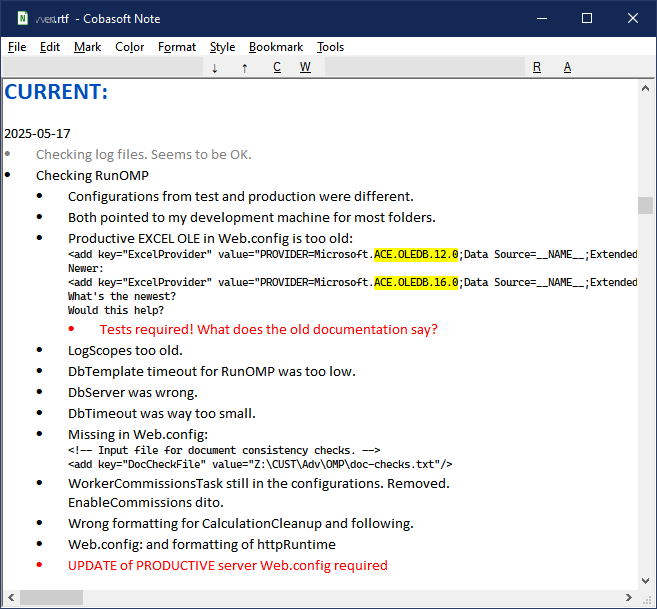
The styles are helpful for brainstorming, task planning or troubleshooting. You can quickly outline and easily mark your ideas, tasks or findings according to structure and priority.
CsNote is not meant as a general word processor. It's features and especially the styles are meant to make it easier to organize simple shopping list as well as large planning, brainstorming or troubleshooting documents.
Styles and Formatting example
Basic Formatting
-
-
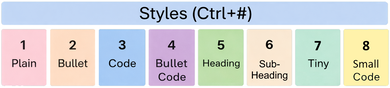
Plain/Reset (Ctrl+1):
Removes all formatting and returns text and paragraph to default style. -
Bullet (Ctrl+2):
Creates a bulleted list.
The shortcut Ctrl+Shift+L toggles through
many bullet- and numbering styles! -
Code (Ctrl+3):
Formats text as monospace code. -
Bullet Code (Ctrl+4):
Formats text as bulletized monospace code. -
Heading (Ctrl+5):
Applies heading style to text. -
Subheading (Ctrl+6):
Applies sub-heading style to text. -
Tiny (Ctrl+7):
Formats of the selected text like "Plain", but with a much smaller font size. -
Small Code (Ctrl+8):
Formats of the selected text like "Code", but with a smaller font size.
Priority Markers
-
-
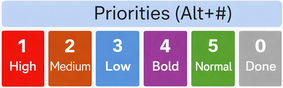
Priority 1 (bold)(red) (Alt+1):
Marks selected paragraphs as highest priority task.
(Applies Red foreground text color) -
Priority 2 (bold)(brown) (Alt+2):
Marks selected paragraphs as medium priority task.
(Applies Orange foreground text color) -
Priority 3 (bold)(teal) (Alt+3):
Marks selected paragraphs as lower priority task.
(Applies Bluish foreground text color) -
Priority 4 (bold)(black) (Alt+4):
Marks selected paragraphs as default task.
(Applies Black foreground text color) -
Priority 5 (plain)(black) (Alt+5):
Marks selected paragraphs as plain text.
(Applies Black foreground text color) -
Priority 0 (gray) (Alt+0):
Marks selected paragraphs as completed task.
(Applies Gray foreground text color)
You might combine this with (Ctrl+K: Strike-out) to indicate canceled tasks.